
Is Novaz Authenticator safe?
The short version is that your setup keys stay in your iPhone's Keychain and never leave it. There's no account and no server holding your codes. Here's the detail, including the limits.
This page describes version 1.0.3 of the app, checked against its code. When something here changes, we update the page and the date above. The app's official privacy policy is on novaz.app.
Where your setup keys are stored
Every account you add has a setup key, the secret your codes are calculated from. Novaz stores the keys in the iPhone Keychain, with the protection class AfterFirstUnlockThisDeviceOnly. In practice:
- This device only. Keys aren't synced through iCloud Keychain. They aren't moved by Quick Start or by restoring a backup onto a different iPhone. If you replace your iPhone, you set up your accounts again. See How to move your authenticator app to a new iPhone.
- After first unlock. After a restart, the keys can't be read until you've unlocked the iPhone once. This also keeps the keys if you later turn off your iPhone passcode, which "when passcode set" items wouldn't survive.
- Not on our servers. There's no Novaz account and no server holding your keys. We couldn't see your keys or codes even if we wanted to.
The app's settings, such as countdown style and whether app lock is on, are stored on the device as well.
How codes are made
Codes are calculated on your iPhone using the standard time-based one-time password algorithm (TOTP, RFC 6238). The HMAC comes from Apple's CryptoKit. Novaz supports:
- SHA-1, SHA-256 and SHA-512,
- codes of 6 to 8 digits,
- intervals from 1 to 300 seconds.
Setup links that ask for anything outside these ranges are rejected instead of being stored. Counter-based codes (HOTP) and MD5 aren't supported.
App lock
App lock is optional. Novaz offers it the first time you open the app, and you can turn it on or change it later in Settings, under Security.
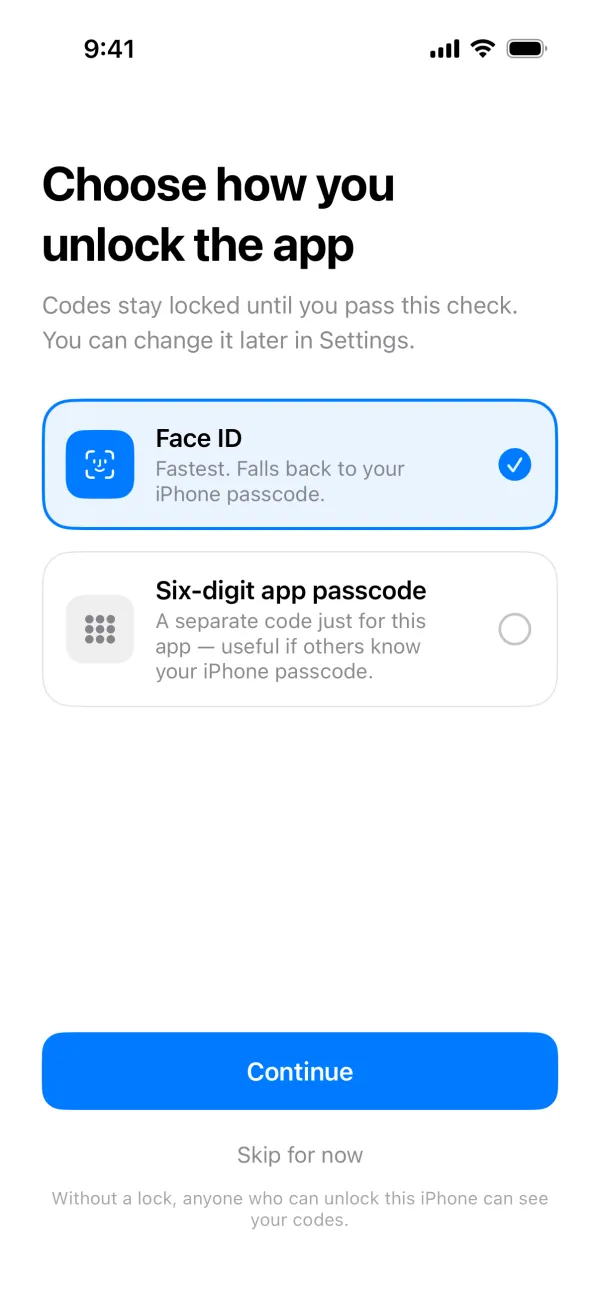
- Face ID or Touch ID uses Apple's LocalAuthentication framework. Novaz never sees your face or fingerprint data, only whether the check passed. If biometrics fail, your iPhone passcode works as a fallback, or your app passcode if you've set one.
- The six-digit app passcode is never stored. Novaz keeps a PBKDF2-HMAC-SHA256 hash of it, with a random salt and 100,000 rounds, in the Keychain on this device. The slow hash makes guessing the passcode from a copy of that item expensive.
- Wrong passcodes trigger waits that grow longer: 30 seconds after the fifth wrong attempt, then 1 minute, 5 minutes, 15 minutes, and 1 hour from the ninth attempt on. The attempt count is stored in the Keychain, so closing the app doesn't reset it.
- Relock delay. You choose whether the app locks immediately when you leave it, after 1 minute, or after 5 minutes.
- Forgotten passcode. If the six-digit passcode is your only way in, there's no reset: Novaz never stores the passcode itself, so it can't be recovered. If you use Face ID with the passcode as a fallback, Face ID still opens the app.
- App Switcher. When the app goes to the background, its screen is covered, so codes don't appear in the App Switcher.
The clipboard
When you copy a code, Novaz puts it on the clipboard with two restrictions:
- it expires when the code stops being valid, and
- it's local only, so Universal Clipboard doesn't send it to your other Apple devices.
Camera and photos
- Camera. The camera is only used while the Scan QR Code screen is open, to read setup QR codes. Nothing is recorded or stored.
- Photos. Novaz doesn't ask for access to your photo library. When you choose a screenshot, iOS's photo picker gives the app only that one image. The app reads the QR code from it and keeps nothing else.
Network requests the app makes
Novaz works offline. Codes don't need a connection. When it's online, the app makes only these requests:
| Request | Why | What's sent |
|---|---|---|
A HEAD request to https://www.apple.com/ |
To read the current time from the response and warn you if your iPhone's clock is off. At most once every 10 minutes while the app is open. | An empty request, with no data about you or your accounts. |
https://novaz.app/apps.json and Apple's itunes.apple.com/lookup |
To list other Novaz apps under More Apps in Settings. | Standard request data only. Your accounts aren't involved. |
| The App Store, through StoreKit | To show prices and handle the PRO subscription. | Handled by Apple. We never see your payment details. |
The app contains no analytics, advertising or tracking SDKs. Its App Store privacy label is "Data Not Collected".
What Novaz can't protect against
Being clear about the limits helps you decide how to use the app:
- Losing your iPhone without backup codes. Because keys never leave the device, there's nothing for us to restore. Keep each service's backup codes somewhere else.
- Someone who can unlock your iPhone, when app lock is off. They can open the app and read your codes. Turn on app lock if anyone else knows your iPhone passcode.
- A compromised device. On a jailbroken iPhone, or one running malware with system access, no app can promise to keep its data private.
- Phishing. A fake sign-in page can ask for your current code and use it straight away. Always check you're on the real website before typing a code.
Reporting a security problem
If you think you've found a vulnerability in the app or this website, email support@novaz.app with "Security" in the subject line. Please give us a chance to fix it before you publish details. Our security.txt has the same contact.